Scrabble HD

Scrabble HD
Version: v.1.14.53
Compatibility: iPad iOS 3.2
Price: $10

Every Holiday season two gaming giants reduce the prices of their games to ridiculous levels that it's impossible to ignore the allure. I've tried to catch up with the backlog games that sit on the last page of my iPad and try to give due attention and after a few months of having Scrabble (from another holiday) I finally spent a great deal of time with Scrabble HD. Possibly even getting more than $1 worth of fun.


If you're not aware of the classic board game of Scrabble here's the brief of it. You get 7 tiles with letters on them to which you must make words on the board with currently existing letters. I always fancied myself good with words and never played Scrabble. After some time with this game my self confidence took a quick nose dive into a deep bucket of ice-cream to which I'm slowly seeking help getting out of.

It's possible to play with iPhones or iPod Touches as tile racks which makes the iPad one of the most advanced and expensive boards (if you choose to look at it like that.) We passed the iPad around and played one of the longest games where we stared at the game for so long and attempted to form words. Lucky for me there's no time limit.

If you love Scrabble, it's absolutely faithful and worth the dollar. But never in my life would I spend $10 on such a thing even when it's cheaper than it's physical cousin. There is an iPhone/iPod version but I doubt it's much different.

Writings

Writings
Version: v.1.4
Compatible: iPad iOS 3.2
Price: $5

My first writing app for the iPad was ia Writer which was hardly fair for all the other word processor apps. I mean really? It's got Dropbox syncing and controls for convenient editing. The only other one I'd consider to get is Pages but what else is there? Surprisingly a lot and sadly my curiosity is piqued. Writings is my first entrance into the soirée of alternate writing apps for the iPad.

The first thing I'd like to mention is that it has absolutely zero personality. It has nice esthetics and standard features but if I had to pick it out in a line up of screenshots I'd have trouble pointing it out. What does it have? Word and character count, textexpander, e-mail, Dropbox sync and AirPrint. On top of that it is able to have control over font and colors of text or the background. If one does choose to take the plunge and get this App they couldn't go wrong the problem is its so adequate and standard to the point where if I have something mind this is just a waste of space.

For the price, ia Writer does it better.

Crunchyroll

Crunchyroll
Version: v1.14
Compatible: iPhone, iPod Touch, iPad iOS 3.1
Price: Free

I can't really review this app without reviewing the service. This is the case for most of the app library since they create an accessible form of their website which moderates the iOS medium. Crunchyroll is an anime streaming service. It's quite premium offering fresh content from the land of the rising sun for a subscription fee which is more or less affordable. Gone are the days waiting months for the localization team to get the rights, draft a translated script, gather up some shitty voice actors, record, edit and broadcast. I dunno actually, that stuff might still be going on. To butcher a cow is a long and strenuous process right?

The Crunchyroll app is basically the iOS version of the website allowing you to stream episodes directly to your phone or pad over wifi (or 3G if you are a paid subscriber although that'd be painful on your data plan.) Ads are only for freeloaders and only appear once before the episode plays as opposed to in frequent bursts like I've seen in some other TV station based apps. It's better than average.

Where this app really shines? True Airview. I know it's a hard thing (supposedly) but when I want to tech the episode on my Apple TV, I can. Shocking I know. This is an example for other apps to look to. If you're app is about streaming or showing videos, it better well do Airview properly damn it! How easy it is to throw an episode onto the TV is beyond meager explanation, it's Heaven and fits into my 'no wires no stress' mantra.

Bottom line? This app = good.

Next!

Version: v.1.3
Compatibility: iPad iOS 4.2
Price: $10

When it comes to task lists, having one always near at hand is as important as making them in the first place for effective daily to-do scheduling. And for many of us, smartphones are our virtual to-do list notepads and calendar. This week we share a few of our favorite task manager apps we think will help you stay on track throughout the day...

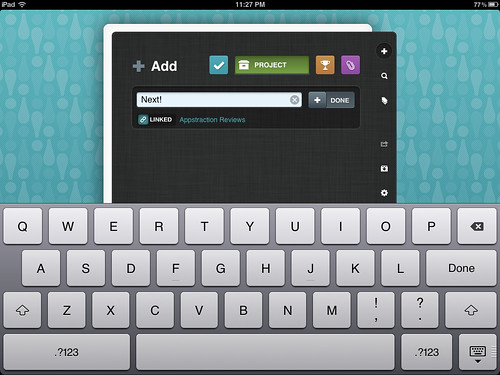
Next! has a little bit more of a learning curve but is an integral part of the iPads app arsenal when given the chance. It doesn't flood the screen with unnecessary buttons and prompts but rather makes smart use of gestures to bring everything within reach. The best thing about this app is how it feels like there's a birds-eye view over all projects. There's also the option to store reference material so information is never too far from reach.

I use it to as my go to clipboard app with my schedule, to do, lists and tasks. It's simple and beautiful to look at while making good use of the bigger screen. The only thing however is the price. For ten bucks it's got to be giving a lot with other apps costing as much. So is it worth it? To have all tasks and keeping life together in one neat little app sounds worth the price of admission then I say go for it. 


Brain Exercise

This may be fundamental for my dissatisfaction but I loved the Brain Age series on the DS. It was fit perfectly in the form of a small digital book. It felt natural in your hands as you wrote answers and played through the quizzes. Its only natural Id anticipate such an experience on my iPhone.

Brain Exercise take after the brain development studies of Dr. Kawashima whom is well known for games such as Brain Age on the Nintendo DS. I didnt think itd be exactly the same after all I loved the book design with the DS and the difference in hardware couldnt be perfectly emulated. I dont have a problem with the tests although playing them requires more precision now than ever, my problem lies within the games menu design.

Every time before a new it explains (in rancid detail mind you) what the task is. If youve taken the same exercise before your natural reaction is to skip it. At the end of that line of 'next page' is a countdown. At this countdown the next page button (the exact same place) turns into a cancel button. If you cancel a Brain Test, you cant do it for the rest of the day. Now thats fucked up.

The 'games' are fun but I found more stressful than enjoyable to the point I let this game settle down until I eventually delete it. Maybe my expectations are too high when I compare it next to Brain Age and it is a fraction of the price. However the game requires an entirely different type of precision compared to shooters and racers. You'll find very often your thumb selecting the wrong answer.

If you dont know what Brain Age is, you'll probably get more fun out of this. Unfortunately for thise who want Brain Age for their phones, keep walking cos this isnt it.