Handwriting


Handwriting
Version: 1.2
Compatible: iPhone, iPod, iPad - iOS 3.0
Price: Free

There are a lot of small, free Apps that are either a waste of space, fun or a thing to show off. Handwriting is one of those types that I downloaded and forgot about until today. This wont take long.

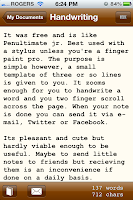
It was free and is like Penultimate jr. Best used with a stylus unless you're a finger paint pro. The purpose is simple however, a small template of three or so lines is given to you. It zooms enough for you to handwrite a word and you two finger scroll across the page. When your note is done you can send it via e-mail, Twitter or Facebook.

Its pleasant and cute but hardly viable enough to be useful. Maybe to send little notes to friends but recieving them is an inconvenience if done on a daily basis.


Fractal


Fractal
Version: 1.0
Compatible: iPad - iOS 4.0
Price: $2

I'm still looking for the iOS substitute to Hexic, a game I very much enjoyed and wreaped the full extent of my initial XBox 360 purchase. I don't know how it'd play or if it'd be even possible but I still have some sort of remnant of hope and belief that I'll open the App Store to my amazement one day. However I will say that the search provides fruitful results and that brings me to the next in my line of sight. Fractal is a new hexagonal tile based puzzle game for the iPad that shows a lot of promise.

Fractal takes place on a board filled with hexagons and blank spaces, the objective being to push the pieces to make a floral pattern or 7 tiles altogether. The learning curve is jumpy seeing as the instructions were absolutely useless but with a bit of tinkering, the rules become obvious. The concept is definitely a recipe for success seeing as it requires more thought rather than a quick finger (like our good friend Hexic.) Mix an engaging gameplay element with styled graphics and a soundtrack that clicks into place and you have an experience that rivals that of Lumines and puzzle games of that caliber.

There are several modes to choose from. Campaign (play through the levels and scenarios,) Arcade and Puzzle (both of which I hope require no explanation.) I enjoyed this game and found great satisfaction from dropping myself into its world. The biggest problem and I'm probably bitching since it's a little newborn but it crashes. To high Hell it crashes when it's getting good or when I progress through the Campaign to the point where I'm terrified to play. And when I do play I'm begging to the little iOS pixies to see me through to the next level but they simply laugh at me and kick me back to the home screen.

I'm sure it's a matter of an update or two to bring it back to speed but for now give it your support so it can get there because this is a game that has a great amount of potential.


Dead Rising


Dead Rising
Version: 2.00.01
Compatible: iPhone (3GS/4), iPod (3rd/4th), iPad - iOS 4.1
Price: $2

Call me a dedicated fan of Dead Rising. It's a game that follows me around and twists my perception of reality. Going to any mall I look at all the prospective weapons all around me. In a crowd of people I put myself in the shoes of Frank West and wonder if push came to shove if I had the strength to clear the way to safety. Its a classic game on the XBox 360 and is one I highly recommend.

I walked into this mess expecting a disaster and what I got was a catastrophe of bullshit compressed to the point of pixels and megabytes. The name sold me, the impending screenshots and trailers were horrifying and disgraceful. In fact the name alone did not sell me at first, I waited for a sale and for this ridiculously priced pile of turd to be laughed at rather than to be regretted. $2 was still not low enough.

Lets start with the scenario. Its the same as Dead Rising 1, even using the same opening sequence. But as soon as the game begins you know you're in for some shit. The mall is nothing like Willamette which isnt necessarily a bad thing but its not like anything. Its forever cast in a murky fog of darkness. There are stores and randomly placed weapons but so few and in between. It only is recognized as a Mall because it's what you're told.

The story is a sandbox survival only, go wherever you please and take up random small missions in the horribly designed mall which is vacant and full of invisible walls. I say missions though I have yet to encounter anything beyond 'Kill All the Zombies' in the assigned area. Sandbox is fine but its not until I realized they implimented some sort of hunger system. It took me a few deaths to figure out that Frank West was starving to death virtually moments after his arrival. Brilliant.

Gameplay? Shit.

Next I'd like to rag on the controls. They are stiff, painful and more torture than fun. Moving Frank in this game is reminiscent of Lara Croft in the original Tomb Raider minus the satisfaction and gymnastics. Looking and playing the game wouldn't have been so bad if it was at least satisfying to kill these zombies. It's like everything is working its damndest against you which should be the case but not the damned controls too. That gives the computer an unfair advantage especially when you can't see enemies around you as well as where you're going in the first place. Send me to fight zombies with a bucket on my head, my hands hand cuffed in front of me and give me some ridiculous concrete boots and that'll give you an idea what playing this game is like.

Controls? They give me nightmares.

On top of all that it looks and sounds like a cake baked from turds, turd related fertilizer and salty piss. Frank looks like a block man and every step he makes, makes the same two hollowed out stepping sounds. Without fail. There are some mall songs taken from the game which is good but on top of all that selective hearing brings those hollow 'taps' over and over.

Graphics and Sound? They make me sad.

So whats good? I liked the menus. They reminded me of Dead Rising.


My Writing Spot (iPhone/iPod)


My Writing Spot
Version: 1.8.4
Compatible: iPhone, iPod - iOS 3.0
Price: $3

Previously I went on about ease of writing on the Mac platform, turning any MacBook or iMac into a free range, open minded page where all the user has to think about is the writing. I have the iPad and Mac covered and never ever imagined that the iPhone/iPod Touch could do the same. It does make sense however that it should but I never thought that it could be up to the task so well.

When I write I usually dedicate time after work at a coffee shop and create a mood. And even then I usually max out at 2 hours after getting settled in. Still I never thought that the iPhone, the one little know-it-all that always can to be so effective. My Writing Spot is an App in the same spirit as iA Writer but has the small developer feel (sometimes clumsy interface and odd graphics.)

Make a file, start writing and go with it. Easy as that. There are no folders but you can tag each piece with a coloured… spot? If you make Project A red then select red and it'll show all of Project A. It's odd but it works. Maybe this'll teach me to move further away from folders.

There are a fistful of fonts (3) and font sizes (also 3) as well as a reverse mode (white font on black) and an App lock mode to secure your files. Back up is done through Google which is hit or miss, I have an account but all I used it for was Gmail so now I've added another purpose to its reportoire. You can access it through the web at mywritingspot.com/write. If you want to add some of your already written files, prepare for a fair bit of copy and pasting.

When I started using it, I found that I started making further progress with my writing projects. It wasn't comfortable but somehow I had gotten lost in them. I used to use the iPad on the bus and such times but still found it to be uncomfortable so I began sketching instead. Having My Writing Spot available in those small pockets of time was surprisingly effective at maximising my efficiency rather than browsing or checking Facebook for the 10th time. It quickly moved onto my Dock and into one of those daily Apps that I'm finding difficult thinking about living without.

On the other hand if there are any other Apps as effective or even more effective than this I think that there is opportunity for discovery here for Apps in the same bane. As it stands now this App is absolutely incredible and will blow you away. Easy, dedicated back up and a writing template that will suck you in. Usually I put on a playlist solely for writing (lyricless, serene) but I didn't even notice I had some rock blaring in my ear when I'm writing away on this App and that's saying something.


Jangle


Jangle
Version: 1.4
Compatible: iPhone, iPod, iPad - iOS 3.0
Price: Free

Not all the games on the App Store are mindless fun, some are mindfully fun. Ignore mindfully for a second because I swear I'm good with words despite not laying down any foundations of proof on this blurb here. There are a small percentage of games that require a bit more thought whether it be word games or puzzle games that requires a sit down and think it through approach. Jangle (formerly Squabble) is a word game taking random letters and turning them into words.

You can either play and pass or play online against other players, taking turns to see who can make the better arrangement. The scoring is Scrabble words, just there is no Scrabble board to play on. As a result the game comes off as a quick fire round of Scrabble without the bickering and arguing over whose turn it is. There is also a 1 player mode against the computer for those ‘Forever Alone’ types.

There's not much to say other than that. It has a scoring system like on Yahoo games where each win or loss has your overall score going up or down. There is no Game Center support and it plays well on both Pad or Pod/Phone. Me and my Fiancee use it as a time killer when waiting for a bus, movie etc.


Here's the bottom line. Love word games? Got someone in the vicinity? Looking for a quick laugh. GO!